
Customized Tutorial
Help you use product customization modules
The following videos and pictures will help you understand how to use our carpet customizer to recolor and resize your favorite designs,
creating the perfect carpet for your space.
Customize
Video Tutorials
We will use videos to explain the usage of customized modules, making it easier for you to use them quickly and efficiently.

1.Find product options
Firstly, open our website,
find the product options on the navigation bar, and click on them
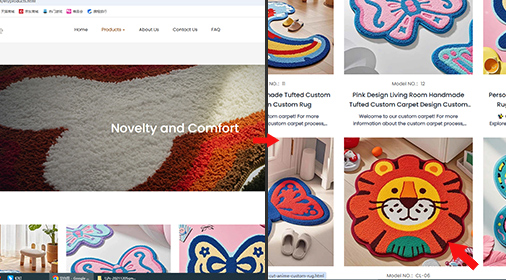
2.Find the product that satisfies you
Now entering the product page,
there are many products for you to choose from.
Find a product you like and click on it. Here, I will use a small lion avatar for demonstration
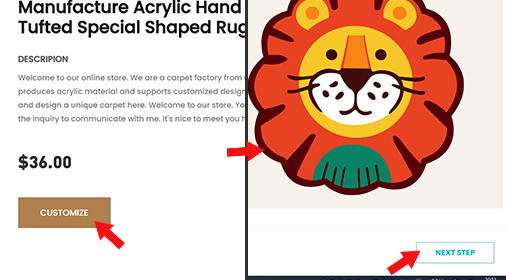
3.Find the customze button
Find the customization button and click on it, On the left side of the page is the customization item,
then find the NEXT STEP button in the bottom right corner and click on it
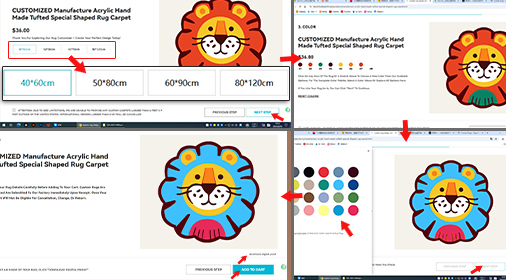
4.Customized size and color
After entering the page, select the size you need on the left side, and then click the next button in the bottom right corner,
Enter the color customization page, you can click on any layer in the image on the right,
then select the color you want to customize on the left, turn off the color version after selecting it, click on the download digital proof in the lower right corner, save the customized image, and then click on add to cart.
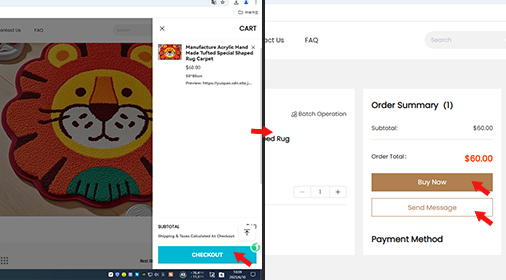
5.Payment or Consultation
Enter the checkout page and click the checkout button in the bottom right corner After entering the page,
you can make a payment directly or send a message for consultation,
The customized tutorial has been completed.
Thank you for watching